Metadata Editor, step by step
Produce several variations of a video or a photo - upload, set the number of versions and the transformations, confirm the preview, export and check uniqueness.
The Metadata Editor produces variations of the same video, in batches. Each version gets a different fingerprint (speed, framing, light, colors…) and cleaned metadata, so it can be published on several accounts without duplicates. It works with photos too. Four steps: Upload, Configure, Preview, Export.
Video or photo
At the top of the tool, the Kind of media to vary tab switches between Video and Photo. Video mode follows the four steps below. Photo mode accepts JPEG, PNG, WebP, HEIC or AVIF; photos are re-encoded in your browser, one by one, and cost no credit.
Step 1: Upload
Drop your videos (MP4, MOV, M4V, WebM), a folder or a ZIP into Videos to vary. The files are sent to your private space to be processed. Then click Continue to the settings.
Step 2: Configure
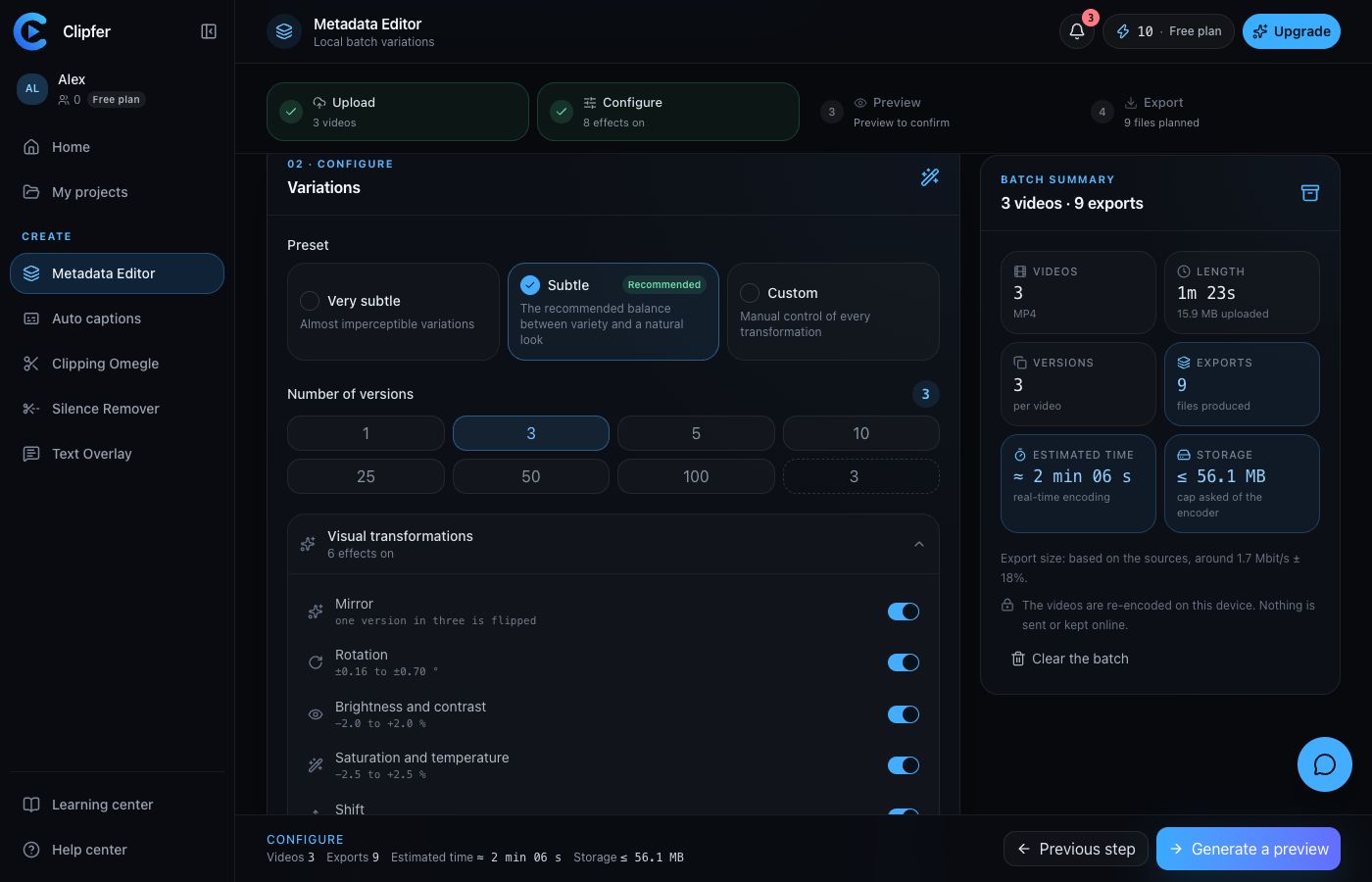
- Pick the Number of versions per video, or type a Custom number of versions, from 1 to 100.
- Pick a Preset: Very subtle (almost imperceptible variations), Subtle (recommended, the balance between variety and a natural look) or Custom (manual control of every transformation).
- In Custom mode, turn each transformation on or off and set the Overall strength.
The available transformations, grouped under Motion and speed and Visual transformations:
| Transformation | What it does |
|---|---|
| Speed variation | From 0.98× to 1.02×. The sound follows the picture, without altering the voice pitch. |
| Zoom and Shift | A light reframe, with no bars or empty corners. |
| Rotation | A subtle rotation. |
| Brightness and contrast | Slightly different light per version. |
| Saturation and temperature | Slightly different colors. |
| Mirror | One version in three is flipped. |
| Variable file size | The bitrate varies around the source's. |
At least one transformation has to stay on, or the exports would be identical. The Output section sets the Resolution (1080p, or Source to keep the original definition, never upscaled), the Frame rate, the format (MP4 or WebM; Automatic gives an MP4) and the quality (Light, Standard, High).
Step 3: Preview
- Click Generate a preview: the tool proposes one version of a video from the batch, with its suggested recipe (speed, zoom, rotation, brightness, saturation, mirror, size).
- Compare with the Original, Variant and Compare modes; both players share the same time.
- Show another version or Generate again change the recipe; Confirm this preview unlocks the export.
The preview applies framing, light and colors; speed and size are listed without being played, but are present in the exported file. If you change the settings after confirming, the tool asks you to confirm again.
Step 4: Export
- Check the summary: Source videos, Versions per video, Exports expected, Estimated storage.
- Click Start the batch, then confirm in the window that shows the cost.
- The files land in Results, grouped By source video or By version. Show the recipe lists the values actually applied to each export.
- Download one file, a selection, or Download everything (ZIP). Retry the failures reruns only the failed versions.
At the end of the batch, the Uniqueness check reads the produced files back: five frames per video (0%, 25%, 50%, 75%, 100%) give a fingerprint, and identical fingerprints flag a potential duplicate. If an identical pair is found, run those files again to get another recipe. This check confirms the files differ from one another; it does not predict how a social network will behave.
What an exported file holds
Each export gets a neutral name, for example vid_a8f2k9.mp4. Source tags (device, GPS, software, title, author), chapters, extra tracks and the tool signature are removed; the file gets the actual date of its render, a new identifier and a new checksum. The audio track is re-encoded, never removed.
Cost
1 credit per version and per minute of video, every started minute with a 2-second allowance. Photos and previews are free; a failed version is refunded.