Each tool does one thing precisely, and shows you the result before you export.
Clipping Omegle
From a long recording to vertical clips
Clipfer detects both webcams, transcribes the conversation and suggests the moments worth keeping. You choose, then each clip is edited in 9:16 — captions, close-ups, sounds — and reviewed before export.
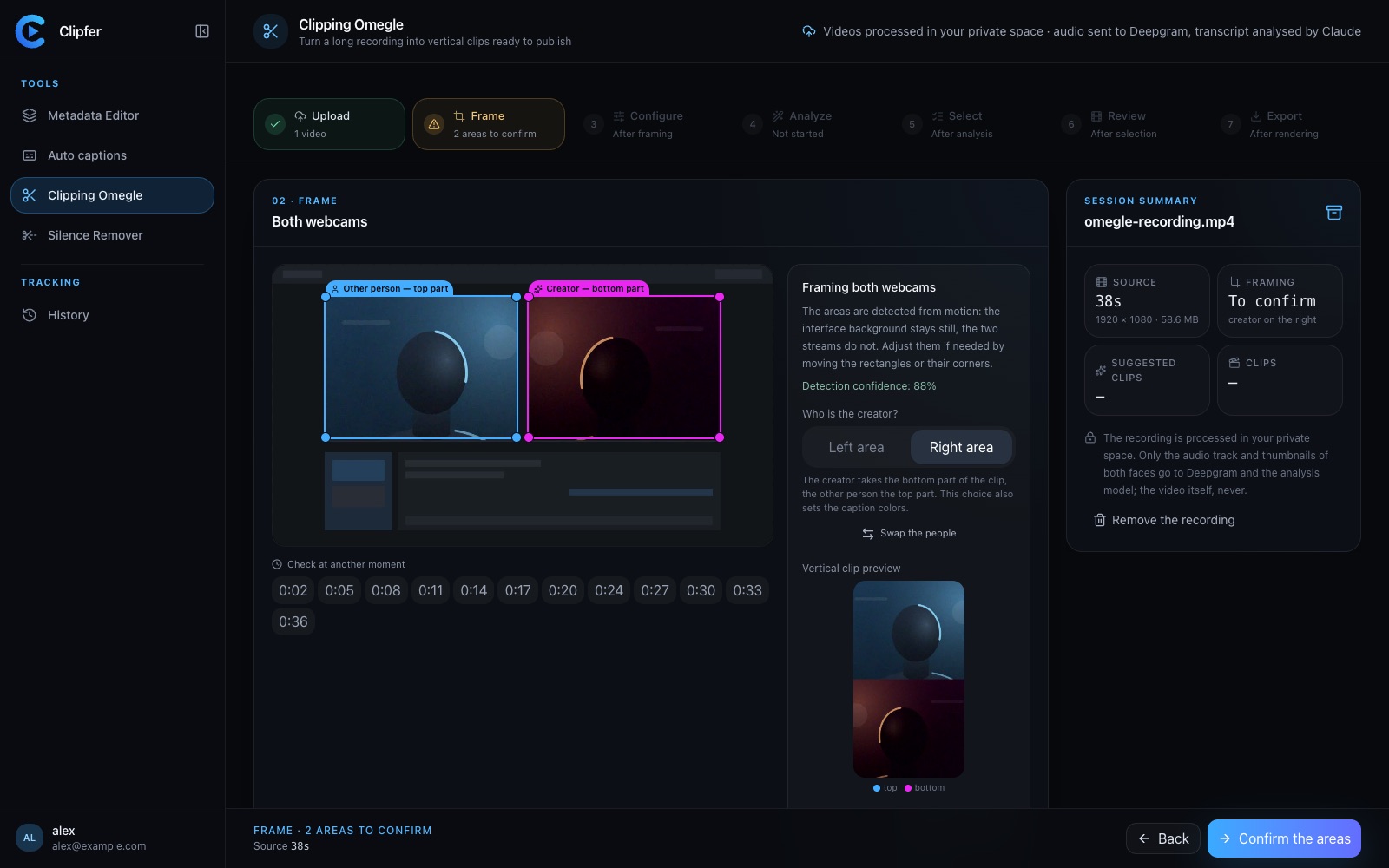
Webcams detected automatically
Moments suggested, chosen by you
Dead air removed, checked on export
Auto captions
Burned-in captions, in batches
Import several videos: Clipfer transcribes them, adds styled captions and lets you fix every word before exporting.
Several videos at once
Adjustable style and placement
Word-by-word corrections
noway,wait
Silence Remover
Fewer gaps, better pacing
Removes silences from an edited video, or a whole folder, with three cut levels from most natural to most dynamic.
One video or a whole folder
Three cut levels
Same format as the import
Metadata Editor
Unique versions of your videos and photos
Turn one video or photo into several versions — framing, light, colour, speed — with clean metadata. Approve a preview before running the batch.
Videos and photos, in batches
Adjustable variations
Clean metadata
02·How it works
Three steps, and you stay in control
01
1. Import
Drop your videos, or a whole folder. MP4, MOV, M4V and WebM, up to 12 GB per file.
Drop your videos here
clip-1.mp4
clip-2.mp4
clip-3.mp4
02
2. Prepare and adjust
Clipfer does the repetitive work: framing, transcription, spotting silences. You check, correct and choose at every step.
Framing confirmed
Captions reviewed
Silences to check
03
3. Export
Download files ready to publish, one by one or as an archive. Every session stays in your History.
clip-1.mp41080×1920
clip-2.mp41080×1920
clip-3.mp41080×1920
Download all (ZIP)
03·Demo
The real software, as you will use it
Screenshots of Clipfer, with demo videos.
clipfer.com/ai-clipping
Frame the recording: both webcams are found, and you adjust their frames.
Video example coming soon
04·Pricing
Simple pricing
Billing not open yet
Clipfer
From$19/month
Sign-ups are not open yet. Nothing is charged for now.
All four tools
Private storage space
History of your sessions
SoonSign-ups opening soon
Planned price, which may change before billing opens.
05·FAQ
Frequently asked questions
Which files can I import?
MP4, MOV, M4V or WebM videos, up to 12 GB per file. The Metadata Editor also accepts photos (JPEG, PNG, WebP, HEIC, AVIF) and ZIP archives.
Do I need to install anything?
No: Clipfer runs in your browser, ideally on a computer. Keep the tab open while a render runs — processing follows your page.
Does Clipfer pick the clips for me?
It suggests, you decide. Moments, cuts and captions stay editable before export.
Where do my files go?
To your private space, which only you can access. For transcription, the audio is sent to Deepgram. For Clipping Omegle, the transcript and a few frames are analysed by Claude (Anthropic) to suggest moments.
Do I need an account?
Yes, but sign-ups are not open yet. Once they open, an email and a password will be enough; your files, settings and profile will stay tied to your account, invisible to others.
How do I get my files?
Every export downloads directly, one by one or as an archive. Your sessions stay listed in your browser’s History.
Is payment available?
Not yet. The planned price is $19 per month, and nothing is charged until billing opens.
Three steps, and you stay in control
1. Import
Drop your videos, or a whole folder. MP4, MOV, M4V and WebM, up to 12 GB per file.
2. Prepare and adjust
Clipfer does the repetitive work: framing, transcription, spotting silences. You check, correct and choose at every step.
3. Export
Download files ready to publish, one by one or as an archive. Every session stays in your History.