Which Analysis Model for Which Recording? Choosing Clipping Omegle Settings
A practical guide to picking the right analysis depth for Clipping Omegle, balancing clip quality, processing cost, and recording length.
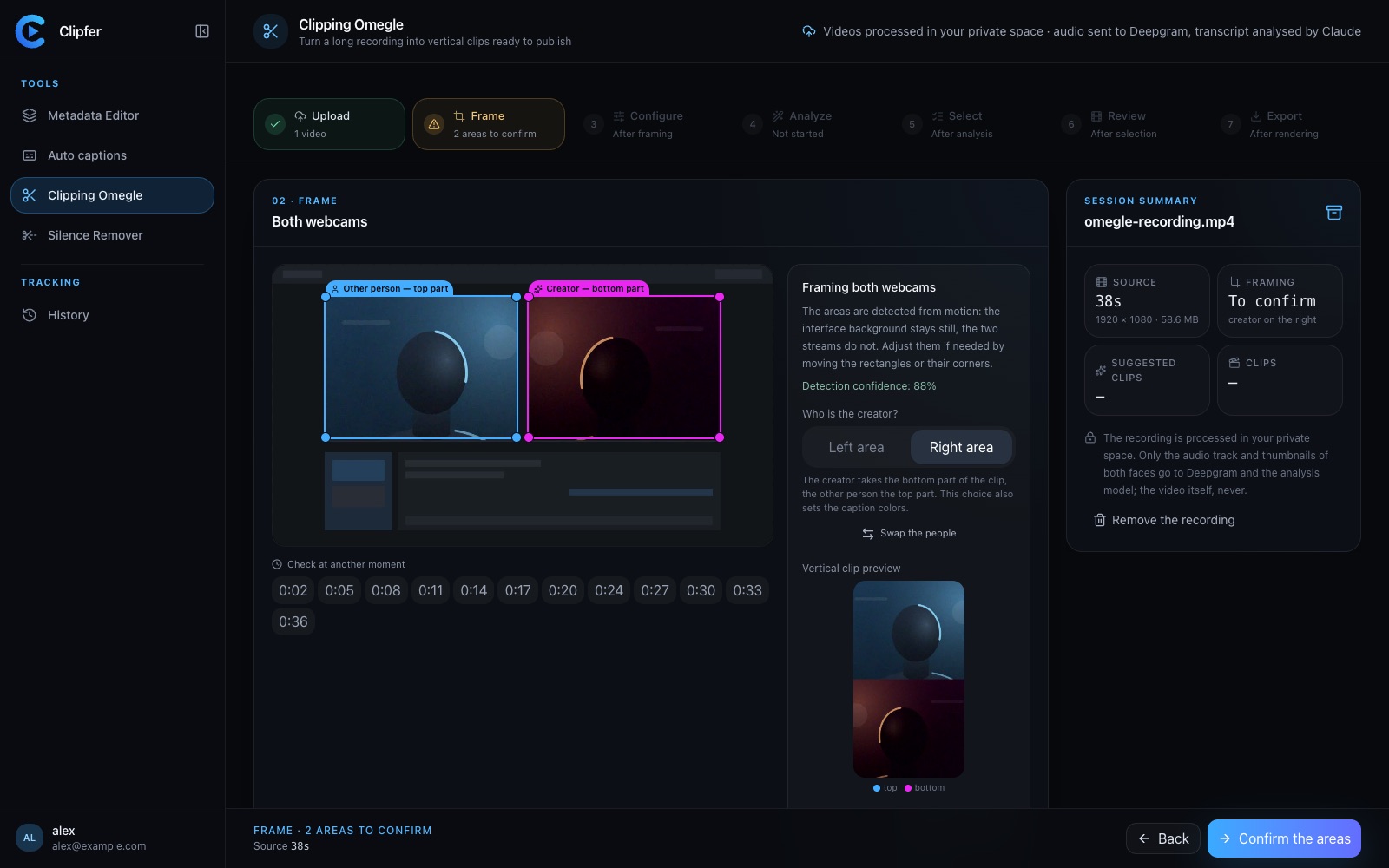
If you record long Omegle or Ome.tv conversations and turn them into vertical clips, one decision shapes everything downstream: how deep you let the analysis model dig into your footage before it suggests clips. Clipping Omegle uses a Claude-based model to scan the conversation, propose the best moments, add captions and sound effects, and cut out dead air. But not every recording needs the same level of scrutiny, and the model tier you pick affects both the credit cost (2 to 6 credits per minute analyzed) and how much editing you'll do afterward.
What the Analysis Actually Does
Before any clip gets built, the model works through the raw recording to:
- Identify the two webcam feeds and keep them stacked correctly
- Spot the passages worth keeping (reactions, punchlines, interesting exchanges)
- Flag dead time to remove
- Suggest where captions and sound effects should land
A lighter model tier moves faster and costs less per minute, but it tends to play it safe, picking obvious high-energy moments. A deeper model spends more time reasoning about context, catching subtler exchanges, callbacks, or slow-burn moments that only pay off a few minutes later.
Match the Model to the Recording Type
Short, high-energy sessions (under 15 minutes) If the conversation is already dense with reactions and fast exchanges, a lighter analysis tier usually finds the good parts without trouble. There's less footage to misread, and the cost savings add up when you're processing many short recordings in a row.
Long sessions with slow buildup Conversations that start slow and build toward a payout benefit from a deeper model. It's better at tracking context across minutes, so it won't miss a joke that only makes sense because of something said five minutes earlier. This is where the extra credits per minute tend to be worth it.
Multiple guests or noisy audio When audio quality is inconsistent or there's cross-talk, a deeper model handles disambiguation better. Lighter tiers can misattribute reactions or miss a laugh buried under background noise.
Batch processing for an agency If you're clipping volume for several creators at once, it often makes sense to run a quick pass with a lighter model first, review which recordings look promising, then re-run only the strongest ones through a deeper model. This two-step approach controls total credit spend while still getting your best raw material the attention it deserves.
Balancing Cost and Output Quality
Credits scale with both the model depth and the length of the recording analyzed, so a one-hour session on a deep tier costs meaningfully more than the same hour on a light tier. A few practical habits help:
- Trim obviously dead sections manually before running analysis, so you're not paying to analyze silence
- Test both tiers on a sample recording from a new source before committing to one for a whole batch
- Keep an eye on your remaining credits on the Subscription page, especially if you're running several recordings back to back across a monthly plan like Creator (19 €, 150 credits) or Pro (49 €, 500 credits)
After Analysis: Don't Skip the Manual Pass
Whichever tier you choose, the editor still matters. The model proposes clips and captions, but it's the editor that lets you adjust timing, swap sound effects, or tighten a cut that ran a beat too long. Treat the analysis as a strong first draft, not a final answer — especially on deeper, more ambiguous recordings where the model made judgment calls you might want to revisit.
Captions Still Need a Human Eye
Even with a deep analysis model, auto-generated captions can misread names, slang, or crosstalk. It's worth a quick correction pass before publishing, particularly on clips you expect to perform well.
Related Resources
Related articles
Clipping an Omegle or Ome.tv conversation: from a long recording to vertical clips
Spotting the right moments, choosing who goes on top in the two-webcam frame, captions, sound effects, the analysis models and their credit cost, and polishing in the clip editor.
Sound Effects and Reactions in Clips: Enough, Not Too Much
How to use sound effects and reaction cues in vertical clips without drowning the moment that actually made people watch.
Jump Cuts Nobody Notices: Pacing Tricks for Vertical Video
How to tighten vertical videos with invisible jump cuts that keep pacing tight without breaking the viewer's flow.